
Key Takeaways
- Chess analysis tools split into real-time (in-position) and post-game (after the fact).
- The strongest routine uses both: most players only do post-game and keep repeating mistakes.
- For live arrows: ChessSolve. For free deep review: Lichess Analysis.
- Live engine tools are for training; using them in rated games breaks the rules and is detectable.
"Chess analysis tool" covers a lot of different things: from a free analysis board you paste a position into, to a coaching app that reviews 200 of your games, to a live engine overlay that draws arrows on your board as you play. The right one depends entirely on when you want the feedback.
This guide sorts the best options in 2026 by what they actually do, so you can pick the right tool instead of the most-hyped one.
Two Kinds of Analysis
Before the list, the key distinction:
- Real-time analysis happens while you're in the position, during a practice game or while studying a line. It's best for learning patterns in context.
- Post-game analysis happens after, reviewing a finished game to find mistakes. It's best for deep, unhurried understanding.
The strongest improvement routine uses both. Most players only do post-game, which is why so many understand their mistakes in review but keep repeating them in live games. (Why that happens: Real-Time Chess Analysis.)
Real-Time / Live Analysis Tools
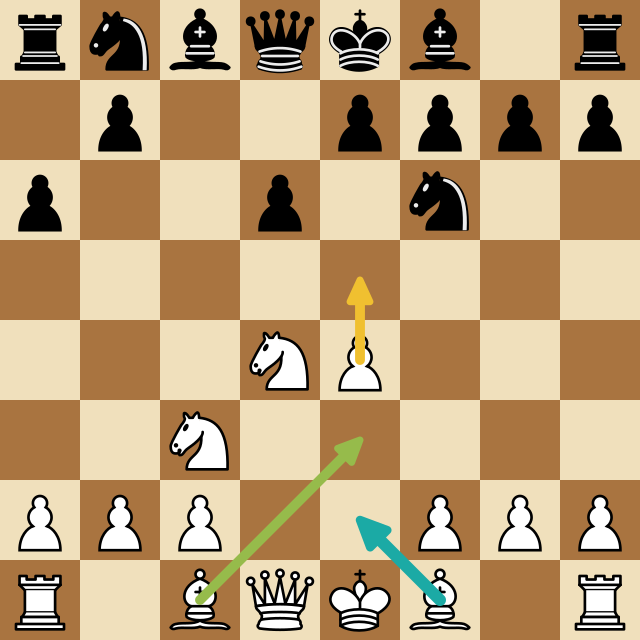
ChessSolve, A browser extension that overlays live Stockfish analysis directly on your Chess.com or Lichess board. Best-move arrows and an evaluation readout update as the position changes. The engine runs server-side, so depth and the number of candidate variants aren't limited by your device, and it installs from the Chrome Web Store with no setup. Built for practice games, bot games, and studying positions in real time. Free, works on both sites. (Setup guide.)
Open-source engine overlays (Mephisto, Chee, and similar GitHub projects): These run Stockfish via WebAssembly in your browser and draw best-move arrows on Chess.com and Lichess. Free and transparent, but they require manual unpacked-extension installation, depth is capped by your device, and maintenance varies: some break when the sites update their board markup. Good for technical users who like to tinker.
Lichess local analysis, Lichess can run Stockfish directly in your browser on the analysis board. It's free, private, and unlimited, but it's a separate analysis board rather than a live overlay on your game: you step through positions manually rather than getting arrows on a live game.
Post-Game Analysis & Coaching Tools
Lichess Analysis + Insights: The most generous free option. Unlimited game analysis with a strong Stockfish version, no ads, plus Insights for statistical trends across your games. Hard to beat for free post-game review.
Chess.com Game Review, Built into Chess.com. Runs Stockfish over your finished game, classifies every move, and gives an accuracy score and a coach-style summary. Limited on the free tier, fuller with a membership.
Aimchess, Connects to your account, analyzes batches of games, and produces weakness reports and training drills. A long-term improvement dashboard rather than an in-game tool. Good for players who want a structured, stats-based plan. (Full breakdown: ChessSolve vs Aimchess.)
DecodeChess, Pairs Stockfish with AI to explain why a move is good in plain language. Useful when you want reasoning, not just an evaluation number. More valuable at 1500+ where the "why" gets subtle.
Chessify, A premium, high-depth cloud-engine platform aimed at serious players and titled players doing opening prep. Overkill for most improvers, excellent if you need extreme-depth neural-engine analysis.
Which Should You Pick?
| Your goal | Best tool |
|---|---|
| Live arrows on the board while you play/study | ChessSolve |
| Free, unlimited post-game review | Lichess Analysis |
| Move-by-move report on a finished game | Chess.com Game Review |
| Weakness tracking across many games | Aimchess |
| Plain-language explanation of moves | DecodeChess |
| Extreme-depth cloud analysis / opening prep | Chessify |
Most improving players need exactly two things: a real-time tool to learn patterns in context (ChessSolve) and a post-game tool to review deeply (Lichess Analysis is free and excellent). That combination covers the full feedback loop without spending much, if anything.
A Note on Fair Play
Real-time engine tools are for training: practice games, bot games, and studying. Using engine assistance in rated competitive games breaks the rules on Chess.com and Lichess, and both detect it. Post-game tools analyze already-finished games and don't raise this issue. Use live tools to learn, not to cheat.
Whichever tools you choose, they only pay off if you use the review process properly: new to engines, start with what Stockfish is.
If you want the real-time half of that routine (Stockfish best-move arrows live on your Chess.com or Lichess board, free and with no setup) ChessSolve is built for exactly that. Pair it with Lichess Analysis for post-game review and you've got a complete, mostly-free analysis stack.
Frequently Asked Questions
What's the best free chess analysis tool in 2026?
For post-game review, Lichess Analysis is the most generous free option. For real-time arrows on your board, ChessSolve offers free live Stockfish analysis on Chess.com and Lichess.
Can I analyze my chess games in real time?
Yes, a live-overlay extension reads the position and shows best-move arrows on the board as you play or study. This is appropriate for practice and training, not rated games.
Do I need to pay for good chess analysis?
No. Lichess Analysis (post-game) and ChessSolve (real-time) are both free and cover most players' needs. Paid tools like DecodeChess and Chessify add explanation depth and extreme engine power for serious players.
What's the difference between real-time and post-game analysis?
Real-time analysis gives feedback while you're in the position, which helps patterns stick in live conditions. Post-game analysis reviews finished games for deep understanding. The best routine uses both.
Analyze any game or position free
Paste a PGN or FEN into ChessSolve's free Stockfish analysis board and get best-move arrows and a live evaluation bar — no account needed.
Open the Analysis Board