
Key Takeaways
- A Stockfish browser extension overlays best-move arrows and an eval bar live on the Chess.com or Lichess board.
- It works while you play, no separate analysis tab, no pasting FENs or importing PGNs.
- WASM extensions run in-browser and are device-capped; server-side tools give consistent higher depth.
- Live overlays are a training tool, using them in rated games is cheating and detectable.
The built-in analysis on Chess.com and Lichess is great, but it only runs after the game is over. If you want Stockfish's evaluation and best-move arrows overlaid directly on the board while you're looking at a position, you need a browser extension.
This guide explains what a Stockfish browser extension actually does, what separates a good one from a junk one (see also our roundup of the best third-party chess engines), and walks through the real options available in 2026.
What a Stockfish Browser Extension Does
A Stockfish browser extension reads the position from the board on Chess.com or Lichess, runs it through the Stockfish engine, and draws the result back onto the page, usually as:
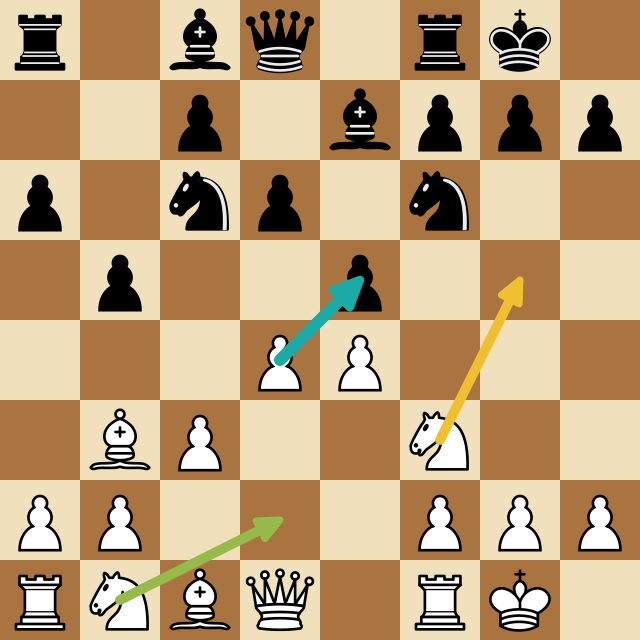
- Best-move arrows overlaid on the board (often the top 2-4 candidate moves, color-coded by strength)
- An evaluation bar or score showing who's better and by how much (here's how to get an eval bar on Chess.com live games)
- Move classifications (blunder, mistake, best move) updated as the position changes
The key difference from the site's built-in tools: an extension works live, on the board you're already looking at, with no separate analysis tab and no waiting for the game to finish. You don't paste FENs or import PGNs: it just reads what's on screen.
How the Engine Runs: WASM vs. Server
There are two architectures, and the difference matters for analysis quality.
Stockfish in WebAssembly (WASM) (the same tech behind Lichess's in-browser analysis) runs the engine inside your browser tab. It's private and requires no backend, but it's limited by your device: on a laptop or phone you'll hit a depth ceiling fast, and it competes with the browser for CPU. Most free open-source extensions use this approach.
Server-side Stockfish runs the engine on a remote machine and streams results back. This removes the device ceiling (you can get higher depth and multiple variants without slowing down your browser) at the cost of needing an account or connection. Tools built for serious analysis tend to use this model.
If you're on a modern desktop and only need a quick blunder check, WASM is fine. If you want consistent depth across devices (especially mobile), server-side analysis is noticeably stronger. (And if you only need to check a single position rather than a live overlay, you can run Stockfish online with no download on an analysis board instead.)
What to Look For
Not all extensions are equal. The things that actually matter:
| Feature | Why it matters |
|---|---|
| Works on both Chess.com and Lichess | Many extensions only support one site |
| Adjustable depth | Higher depth = more accurate; you want control |
| Multiple candidate moves | Seeing the top 3 lines teaches more than one arrow |
| Live board reading | It should track the position automatically as moves are played |
| Evaluation display | A best move without an eval is half the picture |
| Clean, current codebase | Chess.com and Lichess change their DOM often; abandoned extensions break |
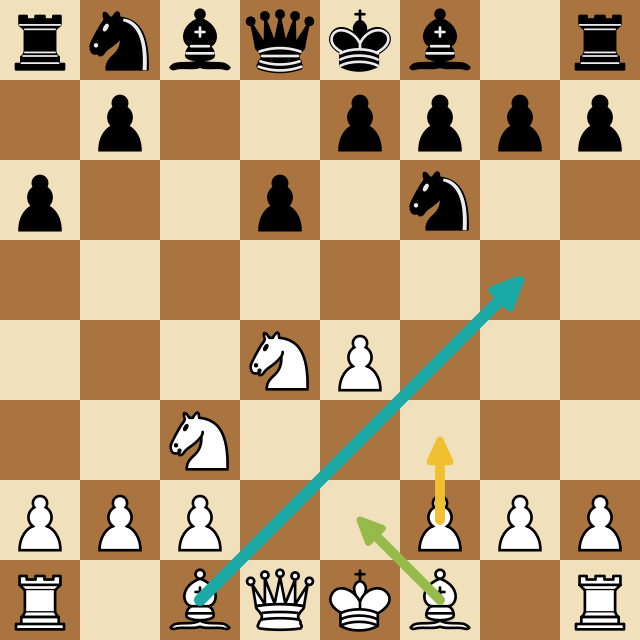
That last point is underrated. A lot of the Stockfish extensions floating around are unmaintained GitHub side-projects that broke the last time Chess.com updated its board markup. Before installing anything, check when it was last updated.
We build ChessSolve, so we see this firsthand: Chess.com and Lichess quietly change their board markup several times a year, and every change breaks any extension that isn't actively maintained. An extension that worked great a year ago can silently stop drawing arrows, which is why "last updated" matters more than star count when you pick one.
The Options in 2026
Here's an honest rundown of what's actually available.
Open-source GitHub projects (e.g. Mephisto, Chee), These run Stockfish via WASM and overlay best-move arrows on Chess.com and Lichess. They're free and transparent, but they require manual installation as an unpacked extension, maintenance is hit-or-miss, and analysis depth is capped by your device. Good if you're technical and want to tinker; rough if you just want something that works.
Position-scanner extensions (e.g. Chessvision.ai): These detect a board from any webpage or image and open it in the Lichess analysis board. Useful for analyzing positions from videos or books, but they're not a true live overlay: you get bounced to a separate analysis page rather than seeing arrows on your game.
"Analyze on Lichess" helpers: These add a one-click button to send a finished Chess.com game to Lichess for analysis. Handy, but again: post-game only, and it's just a shortcut to the site's existing engine.
ChessSolve, A dedicated extension built specifically for live, on-board Stockfish overlay on both Chess.com and Lichess. It runs Stockfish server-side, so depth and the number of candidate variants aren't limited by your device, and it reads the board automatically as the position changes. It installs from the Chrome Web Store or Firefox Add-ons (no unpacked-extension fiddling) and shows color-coded candidate arrows plus an evaluation readout directly on the board.
How to Set Up a Live Overlay
Using ChessSolve as the example, since it's the no-setup path:
- Install ChessSolve from the Chrome Web Store or Firefox Add-ons (free)
- Open Chess.com or Lichess
- Click the ChessSolve icon and press Start Analysis
- Stockfish arrows appear on the board and update after every move
The arrows show the top candidate moves color-coded by strength, with an evaluation readout for the position. You can adjust depth and the number of variants in the extension settings.
Important: Real-time engine overlays are a training tool, for practice games, games against bots, studying positions, and reviewing lines. Using engine assistance in rated competitive games violates the terms of service of both Chess.com and Lichess. Use it to learn, not to cheat.
Is a Stockfish Extension Cheating?
It depends entirely on context. Running Stockfish on a position you're studying, a practice game, or a bot game is exactly how engines are meant to be used: it's no different from opening the analysis board. Running it during a rated game against another human is cheating and against the rules on every major platform, and both sites have fair-play detection that catches it.
The value of a live overlay isn't winning rated games: it's that seeing the engine's suggestion in the moment you're deciding, under the same conditions as a real game, makes the lesson stick far better than a post-game review where the pressure is gone. That's the legitimate, powerful use case. (More on why in Real-Time Chess Analysis.)
Once you've got live arrows, use them the right way: get real-time Stockfish feedback during a game, and see how the extension fits alongside other real-time analysis tools in 2026.
If you just want Stockfish arrows on your Chess.com or Lichess board with no setup, no unpacked-extension steps, and no device-dependent depth ceiling, ChessSolve is built for exactly that: install it from the Chrome Web Store and it overlays live Stockfish analysis on both sites for free.
Frequently Asked Questions
Is there a free Stockfish browser extension?
Yes. Several open-source extensions run Stockfish via WebAssembly for free, and ChessSolve offers free real-time analysis from the Chrome Web Store. Free WASM tools are limited by your device's processing power; server-based tools give more consistent depth.
Does a Stockfish extension work on both Chess.com and Lichess?
Some do, many don't, a lot of extensions support only one site. ChessSolve works on both Chess.com and Lichess automatically.
Will a browser extension slow down my computer?
A WASM extension runs the engine in your browser and can use significant CPU at high depth. A server-side extension like ChessSolve runs the engine remotely, so your browser stays light even at higher depth.
Do I need to paste FENs or import games?
No. A proper live extension reads the board automatically as you play or step through moves, no copying positions or importing PGNs.
Is there a Stockfish extension for Firefox?
Yes. ChessSolve is available on Firefox through Mozilla Add-ons as well as the Chrome Web Store, so you get the same live Stockfish overlay on Chess.com and Lichess in either browser. Edge users can install the Chrome Web Store version for now.
Analyze any game or position free
Paste a PGN or FEN into ChessSolve's free Stockfish analysis board and get best-move arrows and a live evaluation bar — no account needed.
Open the Analysis Board