
Key Takeaways
- A board editor lets you build any legal position from scratch, which is what you need when the position came from a book, a photo, or your own memory rather than from a game file.
- Four settings decide whether your analysis is correct: piece placement, side to move, castling rights, and the en passant square. Getting the side to move wrong analyzes the opponent.
- A position with both kings in check, or no king at all, is illegal and the engine will refuse it. That refusal is useful information, not a bug.
- FEN is the one line of text that encodes an entire position. Copy it and you can move a position between any two chess sites instantly.
Most chess analysis starts from a game: you played it, the site saved it, you press review. A board editor is for everything else. The position in a book you are reading. The puzzle a friend sent as a photo. The endgame you keep losing and want to understand. The variation you are half sure about and want to check before you trust it.
It is a small tool that removes a specific and very common friction: knowing exactly what you want to analyze, and having no way to get it onto a screen.
What is a board editor for?
Four situations, and they cover almost every real use.
Studying from a book. Chess books are full of diagrams with no game attached. Reconstructing the position by guessing the moves that led to it is slow and often impossible.
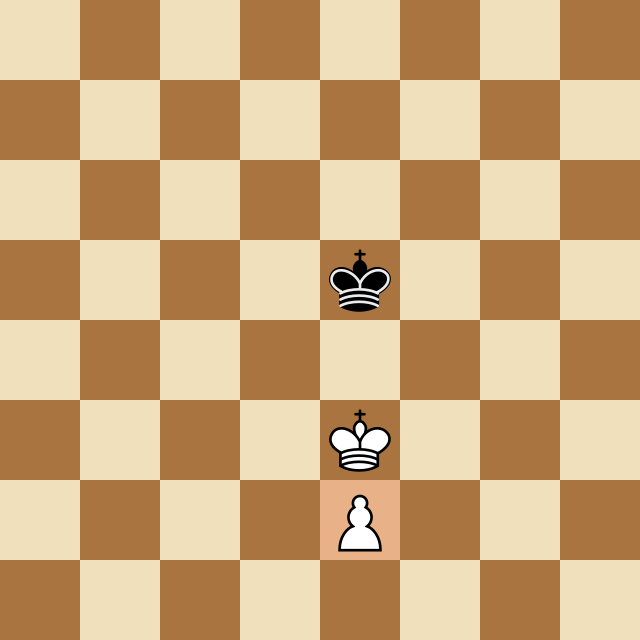
Endgame study. Endgame positions are defined by their structure, not their history. King and pawn against king does not come from a game file, it comes from a setup.
Checking a variation. You calculated a line during a game and want to know if it worked. Set up the position at the end of your calculation and ask directly, instead of replaying the whole game to get there.
A position you saw somewhere. A photo, a stream, a diagram in a post. You can see it and you want the evaluation.
The four things that decide whether your analysis is right
Piece placement is the obvious one and the one people get right. The other three are where the mistakes live.
1. Side to move
This is the single most important setting, and the easiest to leave wrong. An engine analyzing the same position with White to move and Black to move will give you two completely different answers, because it is answering two different questions.
If you set up a position where you are trying to find your best move and leave the turn on the opponent, you will get a confident, well presented, entirely useless answer about what they should do. The evaluation will even look plausible. Check this first, every time.
2. Castling rights
Nothing in the piece placement records history. A rook that left h1 and came back looks identical to a rook that never moved, so an editor cannot know whether castling is still legal. Most default to allowing it whenever the king and rook sit on their home squares.
That default is right most of the time and wrong exactly when it matters, which is usually in a middlegame position you reconstructed by hand. If either king or rook has already moved in the game the position came from, turn the relevant right off.
3. The en passant square
Only relevant for one move, and only when a pawn has just advanced two squares past an enemy pawn. It comes up rarely, but when it does it can be the entire point of the position, so if you are setting up a pawn ending from a book, check whether the capture should be available.
4. Legality
An editor will let you build positions that cannot occur in a game, and an engine will refuse them. The common ones:
- A missing king. Every position needs exactly one of each.
- Kings on adjacent squares. Illegal, because one of them is in check from the other.
- The side not to move is in check. This is the subtle one. If it is White to move and Black is in check, the position is impossible: Black's previous move would have left their own king attacked. Almost always this means the side to move is set wrong.
- Too many pieces. Nine pawns, three bishops of the same color with no promotion to explain them.
When a tool refuses your position, it is usually telling you something true about it. The refusal is worth reading rather than working around.
What is FEN, and why should you care?
FEN, or Forsyth Edwards Notation, is the whole position written as one line of text:
8/8/8/4k3/8/4K3/4P3/8 w - -
Reading it left to right: the piece placement rank by rank from the top, then whose turn it is (w), then castling rights (- for none), then the en passant square (- for none). There are two move counters on the end that you can usually ignore.
The reason it matters is portability. Every serious chess site imports and exports FEN, so it is how a position travels. Copy the FEN from one tool, paste it into another, and the position arrives intact including whose turn it is. If you study across several sites, this single line of text saves more time than any other feature.
From setup to analysis
Building the position is only half of it. The point is what you ask once it is there.
Set the position up in a board editor, confirm the side to move, then take it into an analysis board and let Stockfish evaluate it. What you are looking for depends on why you built it:
For an endgame, the evaluation itself is usually the answer. Winning, drawn, or lost is the question, and the engine settles it immediately.
For a tactical position, look at the top line rather than the top move. A tactic is a sequence, and the first move on its own rarely explains anything.
For a position from a book, compare the engine's preference with the author's. Where they disagree you have found the most interesting page in the chapter, because either the book is teaching a practical idea the engine does not value, or the analysis has been improved on since it was written.
Common mistakes
Leaving the side to move on the default. Said twice on purpose. It is the mistake that produces an answer that looks completely reasonable and is about the wrong player entirely.
Trusting default castling rights in a reconstructed position. The engine will happily plan around a castle that is not legal.
Setting up an approximate position. One pawn in the wrong place can flip an endgame from won to drawn. If you are working from a photo or a memory and you are not sure about a square, you are analyzing a different position, and the answer you get will be confidently wrong about the one you cared about.
Building the position and then analyzing it at low depth. Endgames in particular need depth. A shallow search will miss a long forced sequence and call a won position equal.
Start with something you already lost
The most useful first use of a board editor is a position you remember going wrong. Set it up as best you can, check the side to move, and ask the engine what the position actually offered.
It is a faster route to understanding one mistake than reviewing three whole games, because you already know exactly which moment you did not understand.
Frequently Asked Questions
What is a chess board editor?
A tool that lets you place pieces anywhere on an empty board and set up any position you like, rather than reaching it by playing moves. You use it when the position came from somewhere other than a saved game: a book diagram, a puzzle, a photo of a board, or a variation you are trying to check.
How do I set up a chess position to analyze with Stockfish?
Place the pieces on the board, set whose turn it is to move, correct the castling rights if either side has already moved a king or rook, then send the position to the engine. On ChessSolve you can go straight from the board editor into the analysis board with the position intact.
What is FEN in chess?
Forsyth Edwards Notation, a single line of text that describes a complete position: where every piece is, whose turn it is, what castling is still legal, the en passant square, and the move counters. Almost every chess site can import and export it, which makes it the standard way to move a position between tools.
Why does the engine say my position is illegal?
The most common causes are a missing king, both kings adjacent to each other, or the side not to move being in check. That last one is impossible in a real game, because the previous player would have been leaving their own king en prise. Check whose turn it is set to before anything else.
Do I need to set castling rights manually?
Usually yes. Nothing about the piece placement records whether a king or rook has already moved, so an editor has to guess, and it normally guesses that castling is available whenever the king and rook are on their home squares. If the position arose after those pieces moved and came back, correct it by hand.
Analyze any game or position free
Paste a PGN or FEN into ChessSolve's free Stockfish analysis board and get best-move arrows and a live evaluation bar — no account needed.
Open the Analysis Board