
Key Takeaways
- You can run Stockfish online with no download: the engine runs in your browser or on a server, so there's nothing to install.
- A free browser engine gives you best-move arrows and an evaluation bar on any position, from any device.
- A WASM build is capped by your device; a server-side engine delivers consistent higher depth.
- Use it to review games and study positions, using an engine in rated games is against the rules.
You don't need to install anything to use the strongest chess engine in the world. You can run Stockfish online with no download: the full engine, in your browser, free, on any device. No setup, no executable, no compiling from source. Open a page, put a position on the board, and it tells you the best move.
This guide explains how a browser-based engine actually works, whether it's as strong as the desktop version, and where to run it for game review, position study, and live play.
What Does "Stockfish Online, No Download" Actually Mean?
Stockfish is an open-source chess engine that calculates the strongest move in any position. Traditionally you'd download an executable and load it into a GUI like Arena or a chess app. That still works, but it's overkill for most players, and it doesn't run on a phone.
Running it online instead means the engine lives somewhere other than a program you installed:
- In your browser (WASM). The engine is compiled to WebAssembly and runs inside the tab itself. Nothing leaves your machine, and there's nothing to install. Lichess's "local analysis" works this way.
- On a server. The engine runs on a remote machine and streams the analysis back to your browser. Your device does almost no work, so depth doesn't depend on your hardware. This is how ChessSolve's analysis board runs.
Either way, the result is the same from your side: a tool you open like any other web page and use immediately. No download, no install, and no account on the free options.
Why Run the Engine in Your Browser Instead of Downloading It?
For the vast majority of players, the browser version is simply the better option:
- Nothing to install or update. No executable, no GUI, no keeping it current: you always get a maintained build.
- Works on any device. Phone, tablet, Chromebook, work laptop: if it has a browser, it runs. A desktop download doesn't.
- Instant. Open the page and analyze. There's rarely a reason to install anything unless you're a developer building your own engine setup.
- Free. The engine is open-source, and every reputable browser tool is free for analysis.
The only real reason to download it is running long correspondence-game analysis at extreme depth on a powerful desktop. For game review, opening study, and checking a position, the online route is faster and more convenient.
How Do You Use Stockfish Online With No Download?
The quickest path is a browser analysis board. Using ChessSolve's free analysis board as the example:
- Open the analysis board, no download, no account.
- Paste a FEN or PGN, or set up the position by dragging pieces.
- The engine analyzes instantly and draws best-move arrows on the board.
- Read the evaluation bar and step through the line move by move.
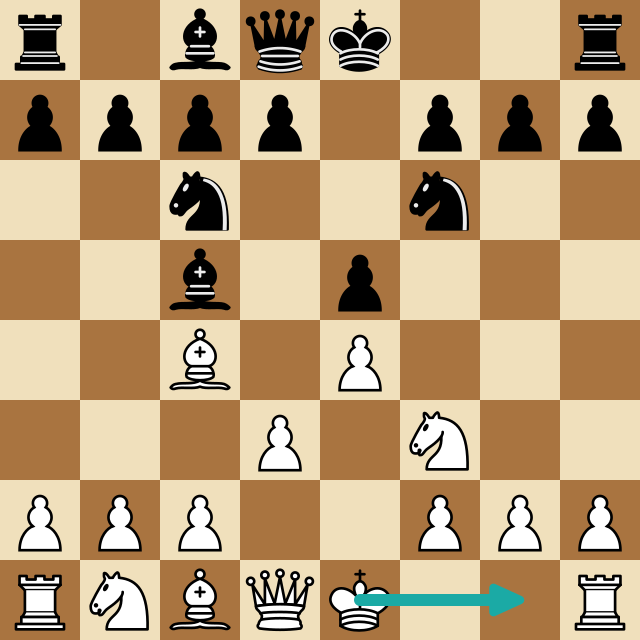
That's the whole workflow, no configuration files, nothing to load, just a page you open in a tab. The same board reviews a full game: paste the PGN and step through it with the engine on every move.
Online vs. the Desktop Download: What Changes?
It's the same program either way. What changes is convenience and how much computing power it gets.
| Online (no download) | Downloaded | |
|---|---|---|
| Install | None: open a web page | Download + set up a GUI |
| Devices | Any browser (incl. phone) | Desktop only |
| Depth | High (server) / device-capped (WASM) | As high as your CPU allows |
| Updates | Always current | You update manually |
| Cost | Free | Free |
| Best for | Review, study, live play | Deep correspondence analysis |
For anyone under master level, the browser version reaches far deeper than you'll ever need to explain your mistakes. You won't play a move that only becomes wrong at depth 30.
Is the Browser Version as Strong as the Download?
Yes, the engine is identical. Same open-source code, same evaluations, same moves. As of 2026 it sits at the top of every major computer-chess rating list, rated well above 3600 on the CCRL 40/15 list: far beyond the ~2850 peak of the strongest humans. That strength ships in every build. The only variable is depth, which comes down to computing power:
- A WASM build shares your device's CPU with everything else. On a modern laptop it's plenty for a blunder check; on a phone it hits a depth ceiling sooner.
- A server-side engine runs on dedicated hardware, so it delivers consistent higher depth and multiple candidate lines regardless of your device.
Building ChessSolve's own analysis, we run the engine server-side for exactly this reason: in testing, a phone's WASM build stalls several plies short of what the same position reaches on dedicated hardware, so the tool, not the phone, does the heavy lifting.
So the real question isn't strength, it's "does it get enough depth?" A good server-based tool matches or beats a typical home download, and does it from your phone.
Can You Run It on Chess.com and Lichess?
An analysis board is perfect for a single position or a finished game. But if you want the engine overlaid live on the board while you play or study on Chess.com and Lichess, a separate board can't do that: you'd be copying positions back and forth.
That's what a Stockfish browser extension is for. It reads the board automatically and draws the arrows directly onto your Chess.com or Lichess game, still nothing to install beyond a one-click browser add-on:
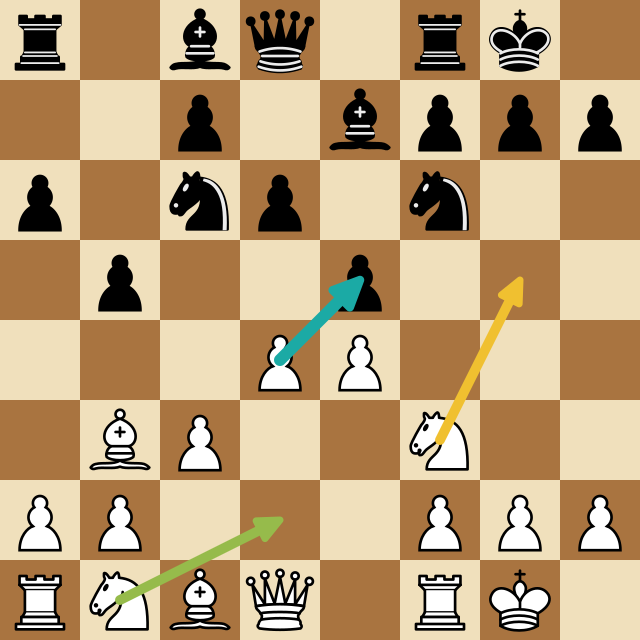
ChessSolve runs the engine server-side, so the live overlay isn't capped by your device: you get consistent depth and several candidate arrows on both sites. It installs from the Chrome Web Store (or Firefox Add-ons) in one click.
Important: a live engine is a training tool, for practice games, bot games, and studying positions. Using engine help in rated games against humans is cheating and against the rules on both sites, and both have detection for it. Use it to learn from the engine, not to cheat.
Is It Really Free?
Yes. Because the engine is open-source, browser-based analysis is free everywhere that matters:
- ChessSolve analysis board: free, no account, no download.
- Lichess, free, open-source analysis, plus in-browser local analysis and free online play against the engine.
- Chess.com, free analysis (deeper computer analysis on the free tier is limited).
Paid tiers on some tools buy you more depth or more candidate variants, not a different engine. The core experience (paste a position, get the best move) costs nothing. (For a full comparison, see the best third-party chess engines.)
You don't have to install anything to use the strongest engine in chess. Open ChessSolve's free analysis board to run Stockfish online with no download: paste a PGN or FEN and get best-move arrows and a live evaluation bar in your browser, free. And when you want it live on your Chess.com and Lichess board, the extension brings the same server-side engine to every game.
Frequently Asked Questions
Can I use Stockfish online with no download?
Yes. You don't need to download or install anything. The engine runs either compiled to WebAssembly inside your browser tab, or on a remote server that streams the analysis back. ChessSolve's free analysis board is one example: open the page, paste a position, and you get best-move arrows and an evaluation bar.
Is the online Stockfish engine free?
Yes. Stockfish is open-source and free, and every reputable browser tool is free for analysis. ChessSolve's analysis board needs no account; Chess.com and Lichess also run it for free inside their analysis boards.
Is online Stockfish as strong as the downloaded version?
The engine is identical, same code, same moves. The only difference is how much computing power it gets. A WASM version is limited by your device, so it reaches lower depth than a fast desktop download. A server-side engine removes that ceiling and can match or exceed a typical home download.
How do I run Stockfish online without downloading it?
Open a browser analysis board such as ChessSolve, Lichess, or Chess.com. Paste a FEN or PGN, or set up the position on the board, and it analyzes instantly, no install, no setup, works on phone or laptop.
Can I play against Stockfish online with no download?
Yes. Lichess and Chess.com both let you play the engine online for free with nothing to install. For studying and reviewing instead of playing, an analysis board is the better tool.
Analyze any game or position free
Paste a PGN or FEN into ChessSolve's free Stockfish analysis board and get best-move arrows and a live evaluation bar — no account needed.
Open the Analysis Board